
Integration Architecture
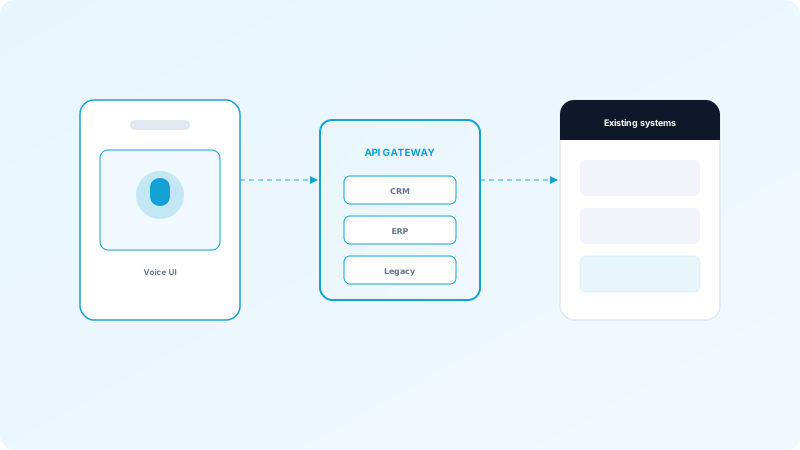
API-First Approach
Design voice AI systems with APIs as the primary integration mechanism:
Event-Driven Integration
Use event-driven architecture for loose coupling:
- RESTful APIs for synchronous operations
- Webhooks for asynchronous events
- GraphQL for flexible data queries
- gRPC for high-performance scenarios
- Publish events for voice interactions
- Subscribe to relevant business events
- Enable real-time updates
- Support multiple consumers
Common Integration Points
CRM Systems
Salesforce Integration:
HubSpot Integration:
Help Desk Systems
Zendesk Integration:
ServiceNow Integration:
Communication Platforms
Slack/Teams Integration:
Email Systems
Gmail/Outlook Integration:
- Create/update leads and opportunities
- Log call activities automatically
- Sync conversation transcripts
- Update customer records with insights
- Track customer interactions
- Update contact properties
- Create tasks and follow-ups
- Sync deal stages
- Create tickets from voice interactions
- Link calls to existing tickets
- Update ticket status automatically
- Provide context to support agents
- Create incidents and requests
- Update knowledge base
- Track resolution metrics
- Integrate with IT service management
- Notify teams of important calls
- Share call summaries
- Enable voice commands
- Provide real-time insights
- Send follow-up emails automatically
- Attach call recordings and transcripts
- Schedule meetings based on calls
- Update email threads with call context
Data Synchronization
Real-Time Sync
For critical operations:
Batch Sync
For non-critical updates:
Conflict Resolution
Handle data conflicts:
- Immediate updates to systems
- Low latency requirements
- Use webhooks or message queues
- Handle failures gracefully
- Periodic synchronization
- Reduced API load
- Better error handling
- Cost optimization
- Define priority rules
- Implement merge strategies
- Log conflicts for review
- Support manual resolution
Security and Authentication
OAuth 2.0
Use OAuth for secure API access:
API Keys
For service-to-service communication:
Role-Based Access
Implement proper access controls:
- Standard protocol
- Token-based authentication
- Refresh token support
- Revocable access
- Rotate keys regularly
- Use different keys per environment
- Store securely
- Monitor usage
- Limit data access by role
- Audit all API calls
- Enforce least privilege
- Regular access reviews
Error Handling and Resilience
Retry Logic
Implement intelligent retries:
Circuit Breakers
Prevent cascading failures:
Fallback Mechanisms
Handle integration failures:
- Exponential backoff
- Maximum retry limits
- Idempotent operations
- Dead letter queues
- Monitor integration health
- Temporarily disable failing integrations
- Automatic recovery
- Alert on failures
- Queue operations for retry
- Store data locally if needed
- Provide manual workarounds
- Notify administrators
Monitoring and Observability
Integration Metrics
Track key metrics:
Logging
Comprehensive logging:
Alerting
Set up alerts for:
- API call success rates
- Latency and response times
- Error rates and types
- Data sync accuracy
- All API calls and responses
- Error details and stack traces
- Performance metrics
- User actions
- Integration failures
- High error rates
- Performance degradation
- Data sync issues
Best Practices
1. Start with High-Value Integrations
Prioritize integrations that provide the most value to users and business processes.
2. Use Standard Protocols
Prefer standard protocols and formats for easier integration and maintenance.
3. Document Thoroughly
Maintain comprehensive API documentation and integration guides.
4. Test Extensively
Test integrations thoroughly, including error scenarios and edge cases.
5. Version APIs
Version your APIs to support backward compatibility and gradual migrations.
6. Monitor Continuously
Implement continuous monitoring to catch issues early and optimize performance.
Common Challenges
Data Format Mismatches
Rate Limiting
Schema Changes
- Map data between systems
- Handle missing fields
- Transform data formats
- Validate data quality
- Respect API rate limits
- Implement request queuing
- Use batch operations
- Optimize request frequency
- Version APIs and schemas
- Support multiple versions
- Plan migration strategies
- Communicate changes early
Conclusion
Successful voice AI integration requires careful planning, robust architecture, and continuous monitoring. By following these best practices, you can build reliable integrations that enhance your existing systems and deliver value to users.